150 Fresh, human edited web2.0 backlinks to your site.
$250
or the unencripted button
Saturday, November 24, 2007


Thursday, October 25, 2007
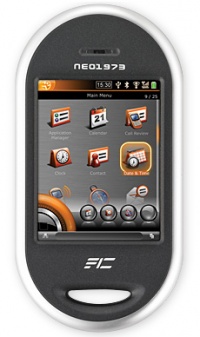
A First Tussle With Linux's iPhone Killer: The OpenMoko Neo1973: "The Neo1973 is the first piece of phone hardware designed to run the open source OpenMoko software platform. Although not yet ready for prime time, the Linux-based mobile OS has hackers excited. Photo: Paul Adams"
Gotta love that a linux iphone rip that you can hack and is not locked to AT&T.
Where do I get mine?
Wednesday, October 24, 2007
Wednesday, October 17, 2007
Monday, July 30, 2007
Saturday, July 28, 2007
Voltaic Backpack, Solar Backpack, Solar Bag
Voltaic Backpack, Solar Backpack, Solar Bag: "The Voltaic solar bags are mobile power generators, designed to charge your devices without tying you to a power outlet, which makes them ideal for traveling."
Cool toy of the moment? This is a good idea for people like me that are constantly needing to charge their digital camera or their ipod.
Solar Back Pack by Voltaic
Cool toy of the moment? This is a good idea for people like me that are constantly needing to charge their digital camera or their ipod.
Solar Back Pack by Voltaic
Monday, July 16, 2007
Sunday, July 08, 2007
Hey riel, what’s the best way to share all these pics and flip video we have of Email? Create a blog or something? you must know....thanks, n
I get this question a lot, so I've decided to post this answer on my blog so I can reference it for others later.
Sign up for a Gmail account http://mail.google.com (it's free)
Then go to http://pack.google.com
Download Picasa, Firefox with Google Tool Bar (don't grab google desktop unless you have a really good processor)
Next off you go to http://blogger.com - sign in with your gmail address
sign up for a new blog... make a post have some fun.
Go open Picasa on your computer, from within picasa you can hit the big B button to post a photo directly to your blogger account.
From within gmail (top right) or in Picasa, you'll notice that there is googles online photo sharing service,(picasa web) you can also use that to create a slide show, store galleries etc.. here's one of mine : http://picasaweb.google.com/djriel/SnowingInVancouver
Finally, for video storage head on over to google video http://video.google.ca/
you can again sign in with your gmail account and then upload videos there
Again from within the interface, when you're watching your / or any video
there is a blue button on the right side that says "email / blog / embed"
hit that, it'll open up and you'll see a link to post it to blogger
you can then write up some text, and it'll embed it into your blog for you.
All very slick and easy once you get used to it.
You can also use the google toolbar (you might have to go into options to add the B button to the tool bar) to blog directly - so highlight whatever you want in a document or on a webpage, hit the big orange B button ... and it'll pop it into a quick post box for you.
A further cool thing you can do is go into your blogger settings (on the site) and set up a mobile number - they'll give you an address to mail to, you can then mail photo's off your camera phone straight to your blog (text in your quick message and then edit it later on the computer)
Welcome to the new age :)
I get this question a lot, so I've decided to post this answer on my blog so I can reference it for others later.
Sign up for a Gmail account http://mail.google.com (it's free)
Then go to http://pack.google.com
Download Picasa, Firefox with Google Tool Bar (don't grab google desktop unless you have a really good processor)
Next off you go to http://blogger.com - sign in with your gmail address
sign up for a new blog... make a post have some fun.
Go open Picasa on your computer, from within picasa you can hit the big B button to post a photo directly to your blogger account.
From within gmail (top right) or in Picasa, you'll notice that there is googles online photo sharing service,(picasa web) you can also use that to create a slide show, store galleries etc.. here's one of mine : http://picasaweb.google.com/djriel/SnowingInVancouver
Finally, for video storage head on over to google video http://video.google.ca/
you can again sign in with your gmail account and then upload videos there
Again from within the interface, when you're watching your / or any video
there is a blue button on the right side that says "email / blog / embed"
hit that, it'll open up and you'll see a link to post it to blogger
you can then write up some text, and it'll embed it into your blog for you.
All very slick and easy once you get used to it.
You can also use the google toolbar (you might have to go into options to add the B button to the tool bar) to blog directly - so highlight whatever you want in a document or on a webpage, hit the big orange B button ... and it'll pop it into a quick post box for you.
A further cool thing you can do is go into your blogger settings (on the site) and set up a mobile number - they'll give you an address to mail to, you can then mail photo's off your camera phone straight to your blog (text in your quick message and then edit it later on the computer)
Welcome to the new age :)
Thursday, June 21, 2007
Everyone loves Riel
This is so cool, when your name is Riel, you rarely find your name on anything, let along a chicks wrist... how hot is that, she's got my name tatoo'd on her body! yum!

Sunday, May 27, 2007

Tuesday, May 22, 2007
Tuesday, February 06, 2007
Second Life: Your World. Your Imagination.
Second Life: Your World. Your Imagination.: "Have a hand in shaping the future of Second Life! Linden Lab announces the release of the Second Life viewer source code.
* Read the Linden Lab blog post
* Read the press release
* Check out our Open Source FAQ and more"
Anyone on this yet? I can't believe 3 Million people have nothing else to do, but if IBM is setting up shop there, I feel I should at least check it out.
* Read the Linden Lab blog post
* Read the press release
* Check out our Open Source FAQ and more"
Anyone on this yet? I can't believe 3 Million people have nothing else to do, but if IBM is setting up shop there, I feel I should at least check it out.
Sunday, February 04, 2007
Friday, February 02, 2007
OK, this has to be one of the coolest computer interfaces that I've ever seen. It makes me wonder instantly... "what could you do with sound if you could interact with it the way they are interacting with images".
Imagine being able to drop on instruments to a flowing loop, bring the pitch and tempo up and down by dragging your hand, slowing it in parts, dropping in new soundscapes... Ummmm
Imagine being able to drop on instruments to a flowing loop, bring the pitch and tempo up and down by dragging your hand, slowing it in parts, dropping in new soundscapes... Ummmm
Subscribe to:
Posts (Atom)

 Posts
Posts


